

Overview
Aether turns a two-channel stereo signal into four channels — front left, front right, rear left, rear right. It does this by extracting the ambience that is already in the recording — hall reverb, room tone, audience, the diffuse part of a stereo mix — and sending it to the rear speakers. The direct sound stays in front.
It is deliberately not a matrix decoder and not a reverb. Nothing is added that was not in the source: every sample in the rear channels comes from what differs between the two input channels. Feed it a mono recording and the rears are digitally silent. Set Rear Amount to 0% and the front output is bit-identical to the input.
The priority behind every design decision is simple: a centred voice must never end up behind you. That is the most damaging thing an upmixer can do, and it is exactly what classic matrix decoders do whenever a recording has small timing or phase differences between channels — which nearly every real recording has. Aether works per frequency and treats those phase differences as part of the direct sound rather than mistaking them for ambience.
Quick Start
- Unzip and copy
Aether.vst3toC:\Program Files\Common Files\VST3\(or your host's VST3 folder), then rescan plugins. - Give Aether a four-channel output: in a DAW, a stereo-in / quad-out insert; in JRiver, set Output Format to 4 channels and Mixing to None (see JRiver Setup).
- Play something with a real acoustic — an orchestral or live recording is the easiest place to start. Watch the Ambient meter: that is how much of the signal Aether judges to be ambience.
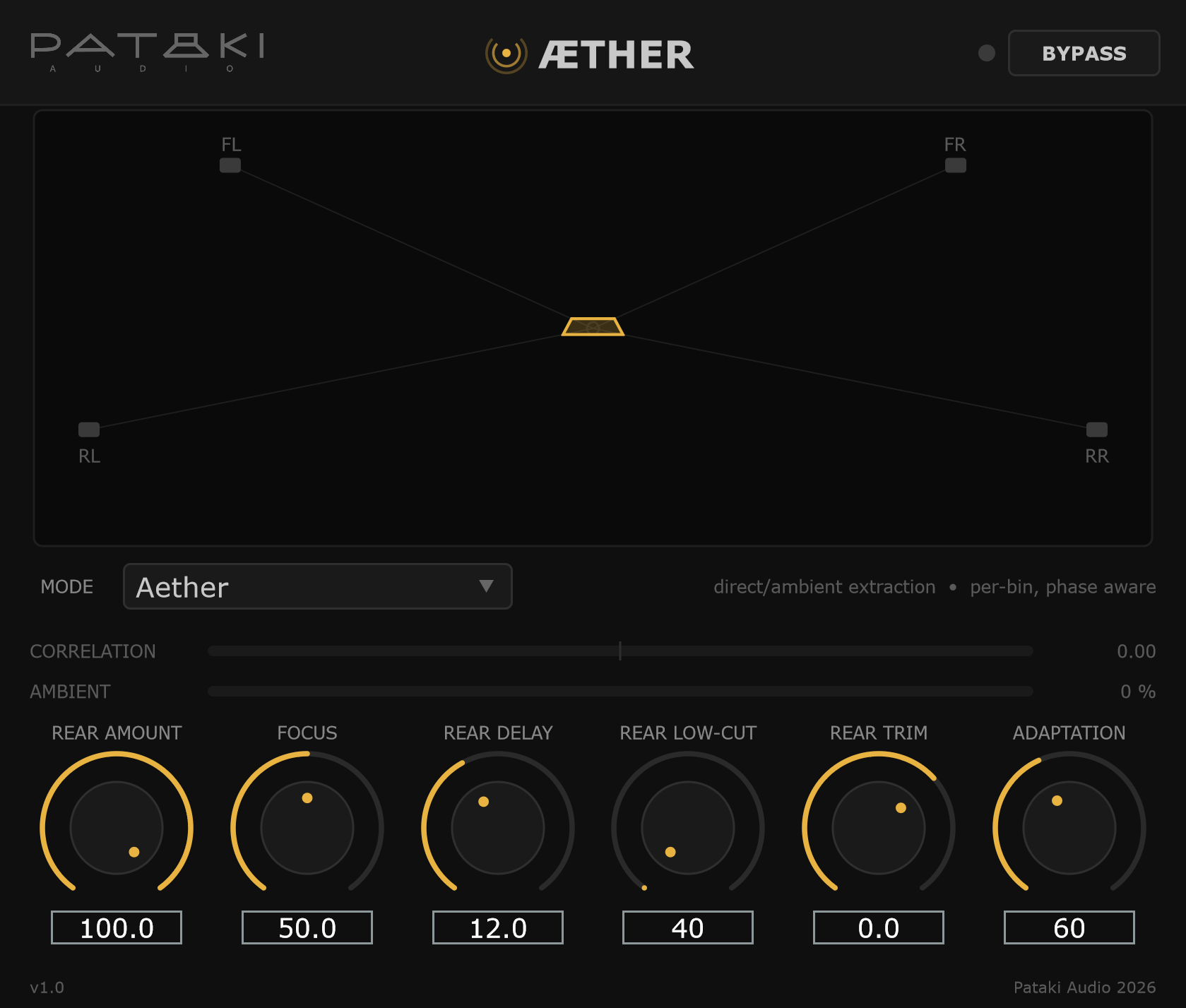
- Start from the defaults — Rear Amount 70%, Focus 50%, Rear Delay 12 ms — and adjust Rear Trim so the rears sit at the right level in your room.
- Switch Mode to Hafler or Matrix and back on a track with a centred vocal. The rear channels should tell you why Aether exists.
JRiver Setup
Aether was built for JRiver Media Center. Four settings in DSP Studio matter:
- Output Format → Output Channels: 4 channels. If your system is wider (5.1, 7.1, 7.1.4), that works too — see below.
- Output Format → Mixing: None. This is the important one. If JRiver's own upmixer (JRSS) is left on, JRiver upmixes before Aether sees the audio, so Aether receives an already-upmixed signal. Aether detects this and shows a red warning in its window — "Host is already upmixing — set JRiver Mixing to None" — but the fix is to turn host mixing off.
- 64-bit internal processing. Aether's entire pipeline is double precision; feeding it 32-bit throws that away for no gain.
- Place Aether after Output Format in the DSP chain, so it receives the bus at its final width.
Wider output formats
JRiver hands every plugin after Output Format exactly as many channels as the format specifies — twelve on a 7.1.4 system — with the stereo source in L/R. Aether accepts any bus of two or more channels and places its four outputs by position:
| Output format | Fronts | Rears from Aether | Other channels |
|---|---|---|---|
| 4.0 (quad) | L, R | Ls, Rs | — |
| 5.1 | L, R | Surround L / R | C, LFE silent |
| 7.1 / 7.1.4 | L, R | Side surrounds | C, LFE, rear surrounds, heights silent |
| Stereo | L, R | — | Latency-matched pass-through |
On 7.1 layouts the side surrounds are used, because at roughly ±110° they are the closest match to a quad rear. Channels Aether does not drive are explicitly cleared, not left carrying whatever the host put there. Version 1.0 is a quad upmixer; centre and LFE extraction are planned.
Latency
Aether reports its processing delay to the host, and JRiver compensates automatically. The analysis frame is fixed in time (about 43–46 ms), not in samples:
| Sample rate | Reported latency |
|---|---|
| 44.1 / 48 kHz | 2048 samples (46.4 / 42.7 ms) |
| 88.2 / 96 kHz | 4096 samples |
| 176.4 / 192 kHz | 8192 samples |
Rear Delay is deliberately not included in the reported latency. It is an intentional offset between front and rear, not a processing delay to be compensated away.
Controls
Aether is the plugin: statistical direct/ambient extraction, per frequency, phase aware.
Hafler is the classic passive difference matrix: rear = L − R, no filtering, no analysis. Matrix is a steered matrix in the Pro Logic tradition: band-limited mono surround with a level-driven steering servo.
The two reference modes exist so you can hear the difference rather than take it on faith. They run at the same latency and obey the same Rear Amount, Rear Delay and Rear Trim — only the steering algorithm changes. They are deliberately left unimproved: no decorrelation, no analysis, no energy law.
Expect Hafler to sometimes sound more dramatic than Aether on wide stereo — it sends everything uncorrelated to the rears without restraint. The difference that matters shows up on material with a centred voice.
How much of the extracted ambience goes to the rear pair; the rest stays in the fronts. The split follows an exact energy law, so turning this up moves ambience rearward without changing total loudness.
At 0% the plugin is mathematically transparent — the front output is bit-identical to the input.
Biases the direct/ambient decision. Above 50%, more content is judged direct: drier, more conservative rears. Below 50%, more content is judged ambient: a more enveloping result, with a higher risk of pulling direct sound rearward. At 50% the estimator is untouched.
Focus changes the decision, never the bookkeeping — at any setting the direct and ambient parts still sum exactly back to the input.
Delays the rear pair to exploit the precedence effect: when the rears arrive slightly later, the image stays anchored at the front even with substantial rear level, and any residual leakage is hidden inside the front image.
12 ms suits rears at about ±110°. For rears further back, around ±135°, start at 8 ms. Values towards 30 ms are past the echo threshold for most material and are there for deliberately spacious settings.
Bass below this frequency stays in the front pair. The energy is returned to the fronts, not discarded — the energy law compensates frequency by frequency, so there is no bass loss and no crossover notch.
Keeping bass out of the rears also keeps it out of the decorrelator, which would otherwise damage low-frequency mono compatibility. Raise it if your rear speakers are small.
Level calibration for the rear speakers, for room and speaker-sensitivity matching. Unlike Rear Amount, Rear Trim does not preserve total energy — that is the point of it. Set it once for your room, then use Rear Amount for taste.
The analysis time constant — how quickly Aether's direct/ambient decision follows the music. Short values are lively and track fast-moving images but can chatter on dense material; long values are stable and smooth. Reverberant classical recordings tend to suit 150 ms or more; close-miked pop around 40 ms.
In the bass, where there are fewer frequency bins to average across, Aether automatically lengthens the time constant to keep the decision stable.
Standard VST3 bypass. The fronts pass through bit-identical (delayed by the reported latency, so timing doesn't jump) and the rears are silent. The LED beside the button lights amber when bypass is engaged.
Display & Meters
Quad field
A plan view of the four speakers with the listener in the centre — fronts at ±30°, rears at ±110°. The amber shape is the energy footprint: each corner is driven by that channel's short-term level (−60 to 0 dBFS). With Rear Amount at 0 it collapses to the front edge; as ambience is extracted, it opens rearward. It is purely a meter — no processing happens on the display.
Correlation
The broadband correlation between the two input channels, from −1 to +1, centre zero. Near +1 means the two channels are nearly the same (mono-like): there is little to extract. Lower values mean more difference between channels and more potential ambience.
Ambient
The fraction of the signal's energy that Aether currently judges to be ambience. This is the plugin's actual decision, exposed. A recording that reads 3% will not upmix — and the meter tells you so before you start blaming the plugin. A dry studio vocal might read low single digits; a hall recording considerably more.
Mode description
A one-line summary of the selected mode appears to the right of the Mode selector, so a comparison is always informed rather than blind. Every control also has a tooltip.
Starting Points
The defaults are a sensible place to begin for rears at ±110°. These adjustments follow from what each control does; trust your ears and room from there.
| Material | Try |
|---|---|
| Orchestral, hall, choral | Adaptation 150 ms+, Rear Amount 70–100% |
| Close-miked pop, studio reverb | Adaptation ~40 ms, Focus 55–65% |
| Live rock, audience recordings | Defaults; raise Rear Amount for more crowd |
| Spoken word, dry mono-ish sources | Expect little rear content — check the Ambient meter |
| Rears at ±135° | Rear Delay 8 ms |
| Small rear speakers | Rear Low-Cut 150–250 Hz |
Calibrate first, then season. Use Rear Trim once to level-match your rear speakers to the fronts with a measurement or SPL meter. After that, Rear Amount is the taste control — it changes where the ambience goes without changing how loud the whole thing is.
How It Works
The signal is analysed in short overlapping frames (square-root Hann window, 75% overlap, about 43 ms per frame). For every frequency bin, Aether models the stereo signal as one panned direct source plus a diffuse ambient field, and estimates from running statistics how much of each is present — including the inter-channel phase of the direct part. That phase term is what keeps a centred voice with slight timing differences between the channels out of the rears.
- Banded to hearing. The statistics are smoothed across frequency on an ERB scale before each decision, so Aether makes about as many decisions as your ear can resolve — no sparkling, flickering ambience at high frequencies.
- Exact split. The direct and ambient estimates (a minimum-mean-square-error pair) always sum back to the input exactly, whatever the estimates are. That is why Rear Amount 0% is bit-transparent and why no setting can damage the front image.
- Energy-conserving. Rear Amount distributes the ambient part between front and rear using a law computed from the actual split in every bin and frame, so total power stays constant.
- Decorrelated rears. The two rear channels pass through independent optimized velvet-noise filters (25 ms, sparse ±1 taps), which widen the rear image so it doesn't collapse to a point behind your head — without audible colouration.
- 64-bit throughout. Analysis, FFT, statistics, decorrelation and delay lines all run in double precision.
Measured
Aether ships with an automated acceptance suite — 26 test cases, all passing. Selected results:
| Test | Result |
|---|---|
| Transparency at Rear Amount 0% | −293 dBFS residual |
| Mono input → rear level | −283 dB |
| Centred source, 0.5 ms / 3 dB offset → rear leakage | −50.6 dB (Hafler −5.0, Matrix −17.5) |
| Total energy across settings | within 0.26 dB |
| Fold-down to stereo vs original | within 0.31 dB per third-octave |
| Rear decorrelator coherence | 0.019 |
| Audio-thread allocations | 0 |
Specifications
- Plugin format
- VST3 (category Fx · Spatial · Surround)
- OS support
- Windows 10+ (64-bit)
- Channels
- Stereo in → quad out; any bus of 2+ channels (4.0 / 5.1 / 7.1 / 7.1.4) with output placed by position
- Sample rates
- 44.1 – 192 kHz
- Precision
- 64-bit double precision throughout; native double processing path
- Latency
- 2048 / 4096 / 8192 samples at 48 / 96 / 192 kHz family (~43–46 ms), reported to host
- Analysis
- STFT, √Hann, 75% overlap; frame fixed in time, so ~22–23 Hz resolution at every rate
- Decorrelation
- Optimized velvet noise, 25 ms, fixed tables (bit-deterministic)
- Parameters
- Mode, Rear Amount, Focus, Rear Delay, Rear Low-Cut, Rear Trim, Adaptation, Bypass — all automatable
- Bundle size
- ~5 MB
- License
- Donationware — pay what you want, including €0
FAQ & Troubleshooting
I only hear the front speakers.
Check that the output format has at least four channels and that Aether sits after Output Format in JRiver's DSP chain. On a stereo bus Aether has nowhere to put the rears and simply passes the fronts through, latency-matched. Also check that Bypass is off and Rear Amount is above 0%.
The rears are almost silent.
Look at the Ambient and Correlation meters. If Ambient reads a few percent and Correlation sits near +1, the recording simply has very little ambience in it — Aether will not invent any. That is by design. Try a live or hall recording to confirm everything is working, and check Rear Amount and Rear Trim.
A red warning says the host is already upmixing.
Aether found signal on input channels beyond L/R, which means JRiver's own mixer (JRSS) is upmixing before Aether. Set Output Format → Mixing: None. The warning latches until the plugin is reloaded, so it may stay visible for the rest of the session after you fix the setting.
Hafler sounds bigger than Aether. Is Aether doing less?
Hafler sends everything that differs between the channels to the rears with no restraint, which can sound impressive on wide stereo. Play a track with a centred lead vocal and listen to the rear speakers alone: the matrices put the voice behind you, Aether does not. If you want a bigger field from Aether, lower Focus a little or raise Rear Amount.
Why is there about 43 ms of latency?
Frequency-domain analysis needs a full frame of audio before it can decide anything. For a media player this is irrelevant because the host compensates, but it makes Aether unsuitable for live monitoring.
Does it use my centre or LFE channels?
Not in version 1.0 — they are kept silent on purpose. A centre channel is the natural next step: Aether already computes where the direct sound is panned, so extracting a centre is a re-pan of what it already knows.
Will the upmix fold back down to stereo cleanly?
Yes. Folding the quad output back to stereo with the standard −3 dB rear mix stays within about 0.3 dB of the original stereo per third-octave band — useful if you switch zones in JRiver.
Is the Matrix mode Dolby Pro Logic?
No. It is an independent reconstruction of the general steered-matrix approach, provided as a reference for comparison. Dolby and Pro Logic are trademarks of Dolby Laboratories; Aether is not affiliated with or certified by Dolby.