WORKSHOP BUDAPEST, HU
CATALOG 08 PLUGINS · GROWING
FORMAT VST3 · WINDOWS · LINUX x64 · ARM64
LICENSE DONATIONWARE · NO ADS

Eight audio plugins, hand-built for people who measure their listening rooms. Pay what you want — including nothing. If the work helps you, throw something in the tip jar.

§01 Janus LINEAR-PHASE LR CROSSOVER · VST3
Janus plugin interface — HPF and LPF sections with Enable and ERF switches, latency mode selector, output meters, live response graph of a 400 Hz – 2.6 kHz band-pass at 96 dB/oct

Two faces. One signal. Linear phase, by design.

A linear-phase Linkwitz-Riley crossover with symmetric reach in both directions — high-pass on one face, low-pass on the other, sum-flat by construction. Built for multi-way active loudspeakers where phase coherence between bands and minimized audible pre-ringing are non-negotiable.

  • 01 Symmetric FIR. Sum of HPF and LPF is mathematically flat — drop two instances on parallel paths and the magnitude rebuilds exactly.
  • 02 Linkwitz-Riley slopes up to 96 dB/oct. From a gentle 1 dB/oct to a brick-wall 96 dB/oct in decimal steps — pick the steepness, keep the phase.No analog-style phase rotation. No magic. The frequency limit per latency mode scales with slope, so pre-ring always stays inside the budget.
  • 03 Latency modes. Low (50 ms) / Normal (250 ms) / Maximum (700 ms) — trade pre-ring against latency to fit the source. Reported honestly to the host for delay compensation.
  • 04 HPF, LPF, or both. Per-face enable means one instance can also be a clean linear-phase HPF or LPF — useful in single-band roles too.
  • 05 ERF shape for steep slopes. From 48 dB/oct each face can swap the Linkwitz-Riley knee for a Gaussian (erf) transition — the same protection half an octave out, up to 27% less pre-ring at −60 dB, and a far deeper stopband.Still sum-flat and still linear phase: an ERF high-pass and an ERF low-pass at the same frequency and slope add up to exactly one.
  • 06 See the filter. A live response graph redraws as you turn the knobs, with dashed curves showing what the neighbouring band has to be for the crossover to sum flat.
Manual
VST3/WIN · LINUX x64 · ARM64/44.1 – 192 KHZ/~ 6 MB
§02 MetaHost VST3 PLUGIN HOST · 8 CHANNEL PAIRS · 3 ROWS · 64-BIT
MetaHost plugin interface — 8 channel-pair columns, 3 plugin slot rows per column, input signal meter showing 12-channel 64-bit precision, Save and Load buttons for presets

Sixteen channels in. Any chain. One plugin shell.

A VST3 plugin host that you load inside another VST3 host. Native 64-bit double precision throughout. Eight channel-pair columns, three slot rows per column — drop a different plugin chain on each stereo pair of a multichannel bus. For active speaker rigs, surround mixes, and anywhere your DAW won't let you route inserts the way you actually need to.

Manual
VST3/WIN · LINUX x64 · ARM64/UP TO 16 CH · 32/64-BIT/~ 12 MB
  • 01 16 channels, 8 pairs. Each column owns one stereo channel pair — perfect for active 8-way speaker rigs, 7.1 surround, or stereo with parallel chains.
  • 02 Three-row chain per pair. Stack up to three plugins in series within each channel pair — load, bypass with one tap, swap on the fly.
  • 03 Floating editor windows. Each hosted plugin's UI opens in its own resizable window — no nested frames, no clipping.
  • 04 Native 64-bit double precision. End-to-end double-precision audio path. Plugins that don't support 64-bit get a clean double→float→double conversion per slot, transparently.Status bar shows current precision at a glance.
§03 Voicing THREE-BAND VOICING EQ · VST3
Voicing plugin interface — three bands (low shelf, parametric bell, high shelf), per-band enable, output meter

Three bands of Baxandall musicality.

A three-band tone control built on Baxandall-style musical curves. Gentle, broad, intentionally reciprocal — cut and boost are mirrored halves of the same adjustment, not two unrelated filters. The shelves taper smoothly toward asymptote at the extremes, so even bold moves stay musical. The bell handles everything from wide tonal lean to focused presence shaping. Built for voicing by ear — the listener-end counterpart to Janus.

  • 01 Baxandall-style curves. Smooth, broad, intentionally reciprocal. Cut and boost mirror each other; the shelves taper toward natural asymptote at the extremes. Heavy-handed settings stay musical instead of becoming brittle.
  • 02 Adjustable shelf slope. Start at gentle 6 dB/oct (classic first-order Baxandall) and step up to 12 or 18 dB/oct when a band needs tighter focus.
  • 03 Bell with adjustable Q. Wide for tonal tilt, narrower for presence shaping. Always musical, never clinical.
  • 04 Per-band enable. A/B each band on its own without losing your settings — hear exactly what each band is contributing.
Manual
VST3/WIN · LINUX x64 · ARM64/44.1 – 192 KHZ/~ 6 MB
§04 Bitscope BIT-DEPTH & TRUE-PEAK ANALYZER · VST3
Bitscope plugin interface — L/R effective bit-depth histograms, sample-clip and intersample-peak counters, true-peak dBTP readout, multichannel source selection

Every bit, accounted for.

A bit-depth and true-peak analyzer for multichannel signal chains. Measures the effective bit-depth of your audio in real time — not the claimed bit-depth, the bits actually doing useful work — and tracks sample clips, intersample peaks, and true-peak dBTP separately per channel. Pick any two channels from a multichannel bus to monitor.

  • 01 Effective bit-depth, measured. Real-time histogram of the actual bits in use per channel. Verify your 32-bit float chain is actually doing 32-bit float work — or watch where the bits drop off.
  • 02 True-peak detection. Separate counters for sample clips and intersample peaks. Catch the inter-sample overs your standard meter misses.
  • 03 Multichannel source routing. L/R source dropdowns pick any two channels from the host bus — useful for verifying multichannel chains, or running per-channel diagnostics on Atmos / surround busses.
  • 04 Configurable analysis window. 0.1 s for instant feedback; longer windows for stable readouts. Reset clears counters on demand.
Manual
VST3/WIN · LINUX x64 · ARM64/MULTICHANNEL · UP TO 64-BIT/~ 6 MB
§05 Helios 300B SET-STYLE WARMTH · WAVESHAPER · VST3
Helios plugin interface — Even Only and Bypass switches, 8-band live harmonics display showing the even-only ladder (2f, 4f, 6f, 8f), Drive, Mix and Auto Gain knobs, L/R output meters

Drive. Mix. Single-ended warmth.

An asymmetric soft-saturating waveshaper voiced for the harmonic character of a 300B SET. Not a tube simulation — an honest waveshaper that draws the same kind of even-dominant ladder a real single-ended triode produces, in a memoryless nonlinearity that's clean, fast, and predictable. The live harmonics display shows you the ladder building as you turn Drive up.

New in v1.1: Even Only. One switch removes the odd half of the curve — every odd harmonic and every odd-order intermodulation product drops to the numerical floor, while the even ladder stays bit-identical. A/B the 300B's even-order warmth with and without its odd companion. Now also on Linux.

  • 01 300B-voiced harmonic ladder. Even-dominant, ~20 dB per even order at reference Drive, with the small odd companion every real single-ended design carries. Voiced by ear against canonical 300B references, locked by measurement.
  • 02 Two knobs that matter. Drive moves you along the saturation curve, Mix blends wet and dry. Auto Gain compensates for level changes from Drive so the controls do what you think they do. No voicing selector, no asymmetry knob, no parameter forest.
  • 03 Live harmonics display. Per-harmonic dBFS readout from 1f to 8f, with even bins highlighted. Watch the ladder build as Drive opens up.A visualization of the curve's character, not a literal output spectrum.
  • 04 Near-zero latency. 4 samples at 44.1 / 48 kHz (under 0.1 ms), fewer at higher rates. Minimum-phase polyphase FIR oversampling — no linear-phase smearing of transients, no long-IR latency cost. Safe to drop into monitoring and live chains.
Manual
VST3/WIN · LINUX x64 · ARM64/44.1 – 192 KHZ/~ 6 MB
§06 Chronos DOUBLE-PRECISION CONVOLUTION · VST3
Chronos plugin interface — WAV file picker with file metadata, Bypass / Normalization / Head Block Size / Output Trim controls, impulse response time-domain plot, honest latency and CPU readout

Any IR. Convolved in double.

A VST3 double-precision convolution engine for room correction, active crossover work, and audiophile playback. End-to-end 64-bit floating point including the FFT itself — not the float-FFT-with-double-buffer compromise most convolvers ship. Non-uniform partitioned, with user-controllable head block size, hot-swap WAV loading, multi-rate filter sets, and an honest latency readout. Load a measured room correction, an active-speaker filter, or a captured IR of any analog hardware — Chronos convolves it cleanly.

New in v1.2: Mix. A wet/dry blend whose dry path is delayed to match the convolver sample for sample, so parallel blends of a correction or a hardware IR never comb-filter. Output Trim (±24 dB) sits after the blend as the master level.

  • 01 End-to-end 64-bit double precision. Every stage runs in IEEE 754 double — input buffer, partitioned convolver, the FFT itself, output. Built on the marton78 pffft fork's double-precision branch with SIMD. Numerical floor sits near 10⁻¹⁶, not 10⁻⁷ — for long-tap correction work the precision matters.
  • 02 Non-uniform partitioned convolution. Small head blocks near the impulse, doubling block sizes for the tail. You pick the head block size — direct latency vs CPU tradeoff. The exact latency is reported to the host for PDC and shown in the UI.Honest, deterministic, no auto-magic.
  • 03 Native multi-rate WAV support. Export your filter at each rate you run — name them filter_44100.wav, filter_48000.wav, filter_96000.wav — and Chronos auto-picks the file matching your host rate. No resampling, exact response. When no native match exists, r8brain-free-src handles the conversion and tells you exactly what it did. Hot-swap loading: drop a new IR into the browser without stopping playback, lock-free filter handoff means the audio thread never blocks.
  • 04 Impulse response display. See the loaded IR in the time domain at a glance. Auto-normalization is optional and off by default — you control the gain structure. Peak level reported alongside the metadata so you know what's hitting the chain.
Manual
VST3/WIN · LINUX x64 · ARM64/44.1 – 192 KHZ · UP TO 262K TAPS/~ 6 MB
§07 Aether STEREO → 4.0 / 5.0 AMBIENCE UPMIXER · VST3
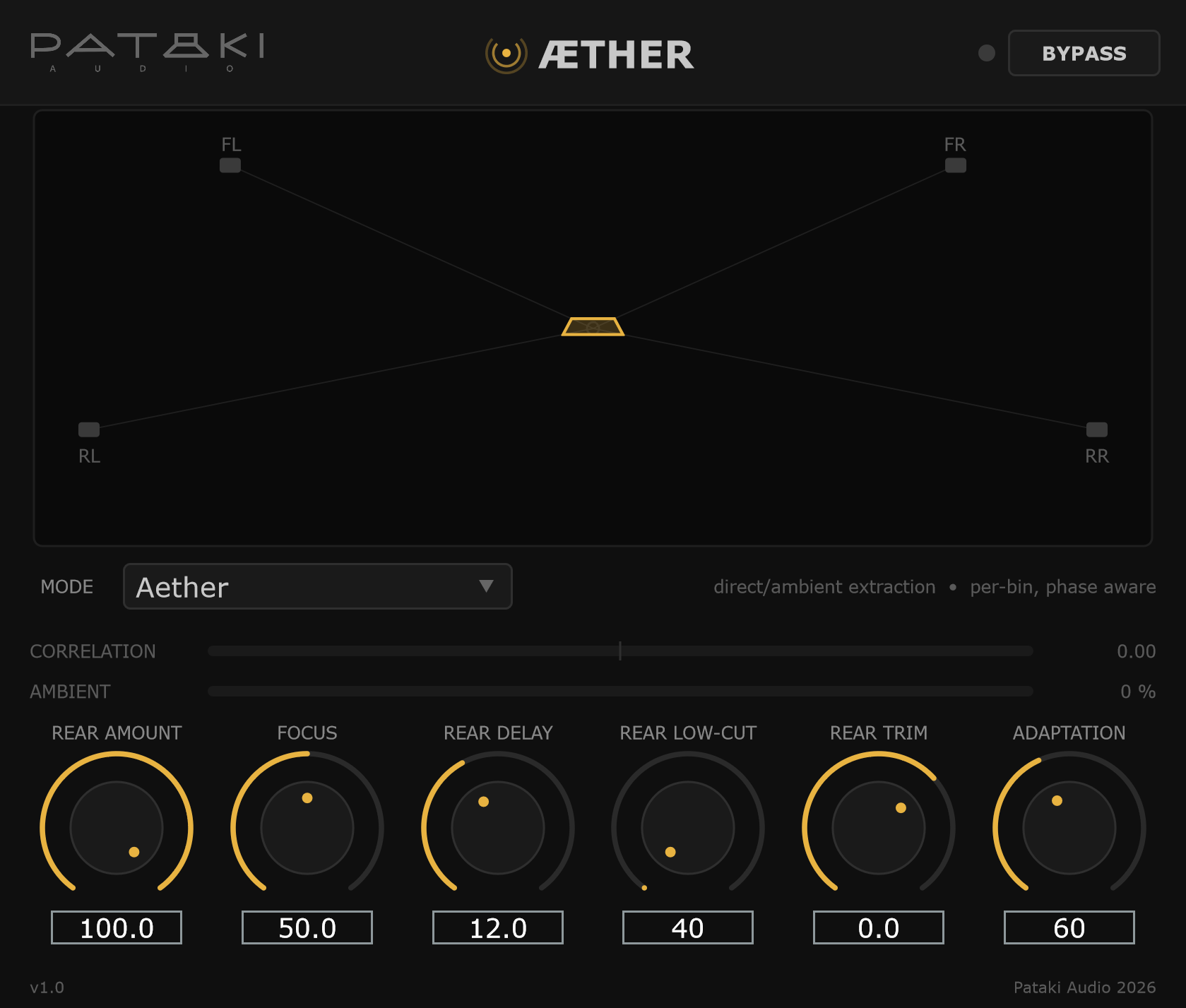
Aether plugin interface — field display with FL, C, FR, RL and RR speakers, Mode (Aether, Hafler, Matrix) and Output (4.0, 5.0) selectors, Correlation and Ambient meters, and seven knobs: Rear Amount, Center, Focus, Rear Delay, Rear Low-Cut, Rear Trim, Adaptation

The room was always in the recording. Now it has somewhere to go.

A stereo-to-quad and stereo-to-5.0 upmixer that extracts the ambience already present in a recording and sends it to the rear speakers, while the direct sound stays in front. Not a matrix decoder and not a reverb — it adds no energy that wasn't in the source. Every bin of the spectrum is split into a direct and an ambient part by a phase-aware statistical estimator, so a centred vocal stays centred while its reverb opens up behind you. Feed it mono and the rears are digitally silent.

New in v1.1: 5.0 and Linux. An Output selector chooses 4.0 or 5.0. In 5.0 the direct sound is re-panned across left, centre and right, each source exactly where it sat in the stereo image — a centred voice moves into the centre speaker, hard-panned instruments stay put, and ambience never goes to the centre. A Center control blends back toward the phantom centre if you prefer it. Now also on Linux.

  • 01 Extraction, not a matrix. Decisions are made per frequency bin, banded to auditory resolution, and inter-channel phase is treated as part of the direct sound rather than mistaken for ambience. On a centred source with a 0.5 ms / 3 dB channel difference, rear leakage measures −50.6 dB — a passive Hafler matrix leaks at −5 dB, a steered matrix at −17.5 dB.
  • 02 Transparent by construction. Direct and ambient estimates sum back to the input identically, so at Rear Amount 0% the front output is bit-identical to the input. Rear Amount moves ambience between front and rear under an exact energy law — the total level never changes.Mono in, rears silent: measured at −283 dB.
  • 03 Hear the difference yourself. A Mode switch puts Hafler and a Pro Logic–style steered matrix next to Aether, at the same latency and with the same rear controls — only the steering changes. A/B them on a record with a centred voice.The reference modes are deliberately left unimproved. Pro Logic is a Dolby trademark; this is a reconstruction of the approach, not Dolby's algorithm.
  • 04 Built for JRiver. 64-bit double precision end to end. Accepts stereo-to-quad in a DAW, or any wider bus JRiver hands it — 4.0, 5.1, 7.1, 7.1.4 — placing the result in the fronts, the centre and the surround pair. Switching 4.0 ↔ 5.0 fades rather than cuts. Live speaker-field display, input correlation and ambient-fraction meters, and a warning if the host is already upmixing upstream.
Manual
VST3/WIN · LINUX x64 · ARM64/2 → 4.0 · 5.0 · 44.1 – 192 KHZ/~ 5 MB
§08 Themis PA CORRECTION EQ · VST3
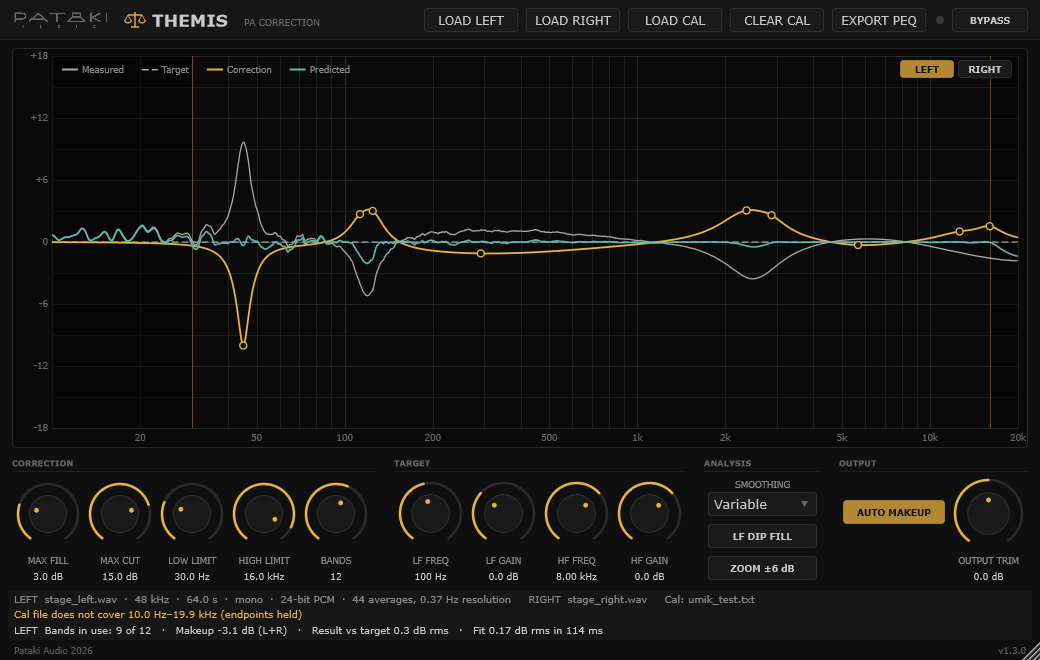
Themis plugin interface — response graph with measured, target, correction and predicted curves, band markers from 20 Hz to 20 kHz and a Left/Right view switch; Load Left, Load Right, Load Cal, Clear Cal and Export PEQ buttons; Correction, Target, Analysis and Output control groups with Smoothing, LF Dip Fill and Auto Makeup; status lines with makeup gain and result vs target

Cuts what it should. Leaves what it can't fix.

PA correction from one pink-noise recording per side. Play pink noise through each side of the system, record it at the listening position with whatever you have — a measurement mic, an iPhone, an iPad — and load the WAVs. Themis measures the system against ideal pink noise, fits a parametric EQ of up to 20 peaking bands plus two target shelves, and runs it on the live signal with zero latency. No sweeps, no reference file, no time alignment.

  • 01 Knows a peak from a cancellation. Peaks are excess energy and are cut at the resolution you choose, down to narrow room modes. Dips are usually reflections cancelling at the mic, so Themis fills only the broad ones, keeps every boost gentle, never boosts outside the range you set — and never lets a boost lift a neighbouring peak above where it was.Up to 20 dB of cut, up to 12 dB of fill (3 dB by default), and LF Dip Fill for the bass dips a boost really can fix.
  • 02 Live, with zero latency. A double-precision biquad cascade reports 0 samples to the host. Move a control and Themis refits 150 ms after you let go, then crossfades to the new EQ over 50 ms — click-free even during a show. Controls that shape the fit are deliberately non-automatable, so host automation can never make a live system refit.
  • 03 A minute is enough. Five is precise. Record at least 60 seconds of pink noise; five minutes gives the most precise result, especially in the deep bass. Themis checks the recording for AGC and clipping, applies your mic's calibration file, and offers Variable smoothing — 1/12 octave in the bass for room modes, widening to 1/3 octave above 2 kHz where single-position detail is mostly reflections.60 s: within ±0.5 dB from 200 Hz up. 5 min: about ±0.3 dB down to 20 Hz.
  • 04 Left and Right, any channel count. Load a recording for each side — or the same one twice for a mono system — and Themis fits both with one set of controls and one common makeup, so the L/R balance never moves. Odd channels run the Left EQ and even channels the Right, at whatever width the host runs: mono, stereo or JRiver's twelve channels. The session stores the analysed spectra and the fitted EQs, so a reload is bit-exact without the WAVs. Export both sides as text for a console or DSP, with the Q convention spelled out.New in 1.3: Load Left / Load Right and a Left/Right view switch.
Manual
VST3/WIN · LINUX x64 · ARM64/1 – 64 CH · ZERO LATENCY/~ 6 MB
§09 Donationware PAY WHAT YOU WANT · INCLUDING NOTHING
// LICENSE

Pay what
you want
.

These plugins were built because I needed them. Not because there's a market, not because there's a roadmap — because the tools I wanted didn't quite exist in the shape I needed.

If you find them useful, throw something in the tip jar. A few euros buys a coffee and keeps the workshop running. A bigger donation buys parts for the next build, which often becomes the next plugin.

If you can't pay, or don't want to — that's also completely fine. Download for free, no questions, no popup nags, no telemetry. The work is the work either way.

Two rules: no ads, ever. No telemetry, ever. The plugin you download is the plugin you run.

§10 Contact REACH OUT · OR PASS IT ON
// CONTACT

Reach out,
or pass it on.

// Email
info@patakiaudio.com

Questions about a plugin, bug reports, feature requests. I read everything and try to reply within a few days.

// Follow
Pataki Audio on Facebook ↗

Updates on new plugins, builds, and the workshop. Low volume, no spam.

// Share