

Overview
MetaHost is a VST3 plugin that hosts other VST3 plugins. You load it into your host — JRiver Media Center, a DAW, any VST3 host — and inside it build a separate plugin chain for each stereo pair of a multichannel bus.
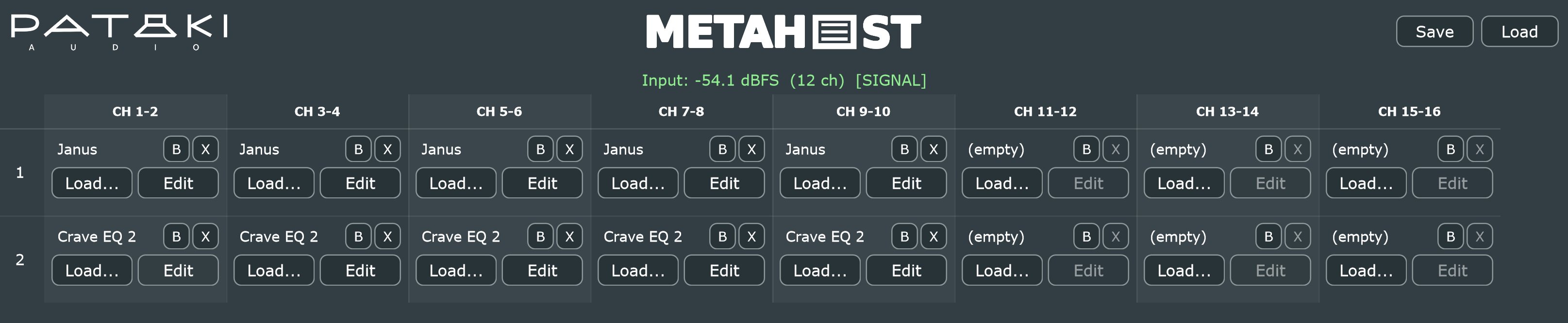
Many hosts, JRiver in particular, apply a VST3 to the whole bus at once: every channel goes through the same plugin with the same settings. That works for a stereo EQ, but not for an active speaker where the woofer, mid and tweeter channels each need their own crossover and correction. MetaHost solves that: its grid has eight columns, one per channel pair (CH 1-2 to CH 15-16), and three slots in each column, run in series.
Every pair is processed independently, and MetaHost keeps them time-aligned: if one pair runs a high-latency linear-phase filter, the others are delayed to match, and the total is reported to the host. The whole path runs at 64-bit double precision when the host does.
Quick Start
- Unzip and copy the
MetaHost.vst3folder toC:\Program Files\Common Files\VST3\on Windows (delete an olderMetaHost.vst3there first), or theMetaHost.vst3folder to~/.vst3/on Linux (or your host's VST3 folder), then rescan plugins. - Insert MetaHost on the multichannel bus. With every slot empty it passes all channels through unchanged.
- Check the status bar: it should show [SIGNAL] with the channel count your host is sending.
- Click Load... in a slot, pick a
.vst3, and that plugin now processes that pair. Click Edit to open its window. - Fill the other pairs and rows as needed. Save stores the whole grid as a preset file.
The Grid
The routing is fixed, which is what makes it predictable:
- Columns are channel pairs. CH 1-2 is host channels 1 and 2, CH 3-4 is channels 3 and 4, and so on up to CH 15-16.
- Rows are processing order. Within a column the signal passes through row 1, then row 2, then row 3. An empty or bypassed slot passes the signal straight on.
- Pairs never mix. What enters CH 3-4 leaves on CH 3-4. MetaHost does not copy, sum or move channels between pairs; do that upstream in your host if you need it.
Fewer than 16 channels. MetaHost runs on any bus from 1 to 16 channels. On a narrower bus the columns beyond it simply receive silence and are discarded: on a stereo track only CH 1-2 does anything, and on JRiver's 12-channel output CH 1-2 to CH 11-12 are live.
The editor window can be resized; the grid scrolls sideways when it is wider than the window.
Slot Controls
Each slot shows the loaded plugin's name, or (empty), and four buttons:
Opens a file dialog to pick a VST3. On Windows it opens in C:\Program Files\Common Files\VST3. On Linux it opens in ~/.vst3 (or /usr/lib/vst3, /usr/local/lib/vst3) and accepts either the .vst3 bundle folder or any file inside it, such as the .so. Loading into an occupied slot replaces its plugin.
Opens the plugin's own editor in a separate, resizable window. Each additional window opens slightly offset from the last so they don't stack exactly. Clicking Edit again brings an open window to the front.
Bypasses the slot: the signal passes straight through and the plugin is not processed. The plugin and its settings stay loaded. A bypassed slot contributes no latency, so the pairs are re-aligned when you toggle it (see §06).
Closes the plugin's window and removes it from the slot.
Status Bar
Below the header, a single line reports what the host is actually sending MetaHost, updated ten times a second. It is the fastest way to diagnose a silent chain.
- Green
Input: −18.2 dBFS (12 ch) [SIGNAL] | 64-bit— audio is arriving; peak level across all channels, the bus width, and the processing precision- Yellow
processBlock: called (12 ch) — buffer is SILENT— the host runs MetaHost but sends silence- Orange
processBlock: called with 0-channel buffer— the host is running MetaHost with no audio channels- Red
processBlock: NOT called by host— the host has not started processing MetaHost at all
The level shown is the input to MetaHost, before any slot — a quick check that signal reaches it at all.
Latency & Alignment
Linear-phase crossovers and EQs delay the signal, often by tens or hundreds of milliseconds. If one pair of an active speaker is delayed and the others are not, the drivers no longer sum correctly.
MetaHost compensates automatically. It adds up each column's latency, delays every other column to match the slowest one, and reports that total to the host, which can then keep audio and video — or other tracks — in sync. This is recalculated whenever a slot changes:
- when a plugin is loaded or removed;
- when a plugin changes its own latency — for example, an EQ switching between linear-phase and minimum-phase modes;
- when a slot is bypassed or un-bypassed, because a bypassed slot adds no delay;
- when a session or preset is loaded.
Because the total latency changes, the host has to re-align when you toggle a high-latency plugin; depending on the host this can briefly interrupt playback. Make those changes while stopped where you can.
32 / 64-bit Precision
MetaHost runs at whatever precision the host asks for; the status bar shows 32-bit or 64-bit. In a 64-bit host such as JRiver, the whole path between input and output is 64-bit double.
Hosted plugins are handled one by one. A plugin that supports 64-bit receives 64-bit audio directly. A plugin that supports only 32-bit gets its pair converted to 32-bit for that slot and back to 64-bit afterwards, automatically. The rest of the chain stays in 64-bit.
Presets & Sessions
The host saves MetaHost's whole state with your session or DSP configuration: for every slot, which plugin is loaded, its complete settings, and whether it is bypassed.
The Save and Load buttons in the header do the same thing with a file: a .metahostpreset file holding the entire grid. Use them to keep alternative setups — different crossover versions, a listening position, a measurement configuration — and switch between them, or to move a configuration from one host to another. The dialogs open in your Documents folder.
- Loading a preset or session replaces the whole grid: slots that are empty in the preset are cleared.
- A plugin listed in the preset but not installed is skipped, and its slot stays empty; the other slots load normally.
- Each plugin is reloaded from the file path saved in the preset. To use a preset on another computer, install the same plugins in the same place — the standard VST3 folder makes that easy.
JRiver & Active Speakers
MetaHost was built for JRiver Media Center driving active multi-way speakers. A typical setup for a stereo 3-way system on a 6-channel output:
- In JRiver, set the output to the channel count your DAC uses, and route each speaker's feed to the channels of one driver — for example, woofers on 1-2, mids on 3-4, tweeters on 5-6. JRiver's own channel routing does the copying; MetaHost does not.
- Add MetaHost in DSP Studio. The status bar should read (6 ch).
- In CH 1-2, load Janus as a low-pass for the woofers; in CH 3-4, Janus as a band-pass; in CH 5-6, Janus as a high-pass.
- Use rows 2 and 3 for per-driver correction: Chronos with a measured filter, Voicing for tonal balance.
- Click Save to keep the setup as a preset.
Because each driver's chain has its own column, every driver gets its own settings, and MetaHost's alignment keeps all three in time even when only one of them runs a long linear-phase filter.
Before updating MetaHost, click Save to keep the grid as a preset. If the host keeps showing old channel or version information after the update, remove MetaHost from the DSP chain, add it again, and Load the preset: hosts cache a plugin's channel and MIDI information, and removing the plugin discards the settings stored in the chain.
Specifications
- Plugin format
- VST3; hosts VST3 plugins
- OS support
- Windows 10+ (64-bit); Linux x64 with glibc 2.35+ (Ubuntu 22.04+, Debian 12+, Fedora 36+); Linux ARM64 with glibc 2.28+ (Raspberry Pi OS 64-bit on Pi 4/5, Ubuntu 20.04+ arm64)
- Channels
- 1 – 16, input = output; 8 stereo pairs
- Grid
- 8 columns (one per pair) × 3 serial slots
- Routing
- Fixed: each pair stays on its own channels
- Latency
- Automatic compensation across pairs; the largest column's total is reported to the host
- Precision
- 32 or 64-bit, following the host; per-slot conversion for 32-bit-only plugins
- Hosted plugins
- Stereo slot; transport and tempo forwarded to every plugin
- State
- Saved with the host session;
.metahostpresetfiles for presets - Editor
- Resizable, 1300 × 370 by default; plugin editors in separate windows
- Bundle size
- ~12 MB
- License
- Donationware — pay what you want, including €0
FAQ & Troubleshooting
A pair is silent.
Check the status bar first. If it reads [SIGNAL], audio reaches MetaHost; then check the channel count — on a 6-channel bus, CH 7-8 and above receive nothing. If a loaded plugin is the cause, bypass it with B: if the sound returns, look at that plugin's settings.
Can I send one input to several pairs, or sum pairs?
No — routing is fixed by design, so each pair's path is always obvious. Copy or move channels in your host before MetaHost. In JRiver, the channel routing in DSP Studio does this.
What happens with a mono plugin, or one with more channels?
Each slot is stereo. A mono plugin processes the left channel of its pair, and the right channel passes through unchanged — so use a stereo instance, or put the mono plugin in a pair where only the left channel matters. Extra inputs a plugin has, such as a side-chain, receive silence.
In JRiver, opening a second plugin editor closes the first.
A known limitation: JRiver closes the first editor window when another one opens, and the exact mechanism has not been identified. Work with one editor at a time; your settings are not affected.
A plugin's window is tiny on my high-resolution screen.
On Windows, MetaHost tells each plugin editor the screen's scale factor, and plugins that support scaling resize themselves. Plugins whose editors don't respond to it stay at their native size; that is down to the plugin. On Linux the desktop's scaling is applied directly.
The latency reported to my host changed.
That is MetaHost keeping the pairs aligned: the total follows the slowest column, and changes when you load, remove or bypass a plugin with latency, or when a plugin changes its own latency (§06).
A preset loaded, but some slots are empty.
Those plugins are not installed at the path stored in the preset — not installed on this computer, or installed in a different folder. Install them in the standard VST3 folder, then load the preset again.
Can MetaHost load VST2, AU, CLAP or LV2 plugins?
No, VST3 only, on both Windows and Linux.
How do I install it on Linux?
Copy the MetaHost.vst3 folder to ~/.vst3/ (or /usr/lib/vst3/ for all users), then rescan plugins in your host. Use the x64 download on a PC (glibc 2.35 or newer — Ubuntu 22.04+, Debian 12+, Fedora 36+ or a current Arch) and the ARM64 download on 64-bit ARM Linux such as a Raspberry Pi 4 or 5 running 64-bit Raspberry Pi OS (glibc 2.28 or newer). Neither needs a separate C++ runtime. It hosts Linux VST3 plugins, in 32 or 64 bit.