

Overview
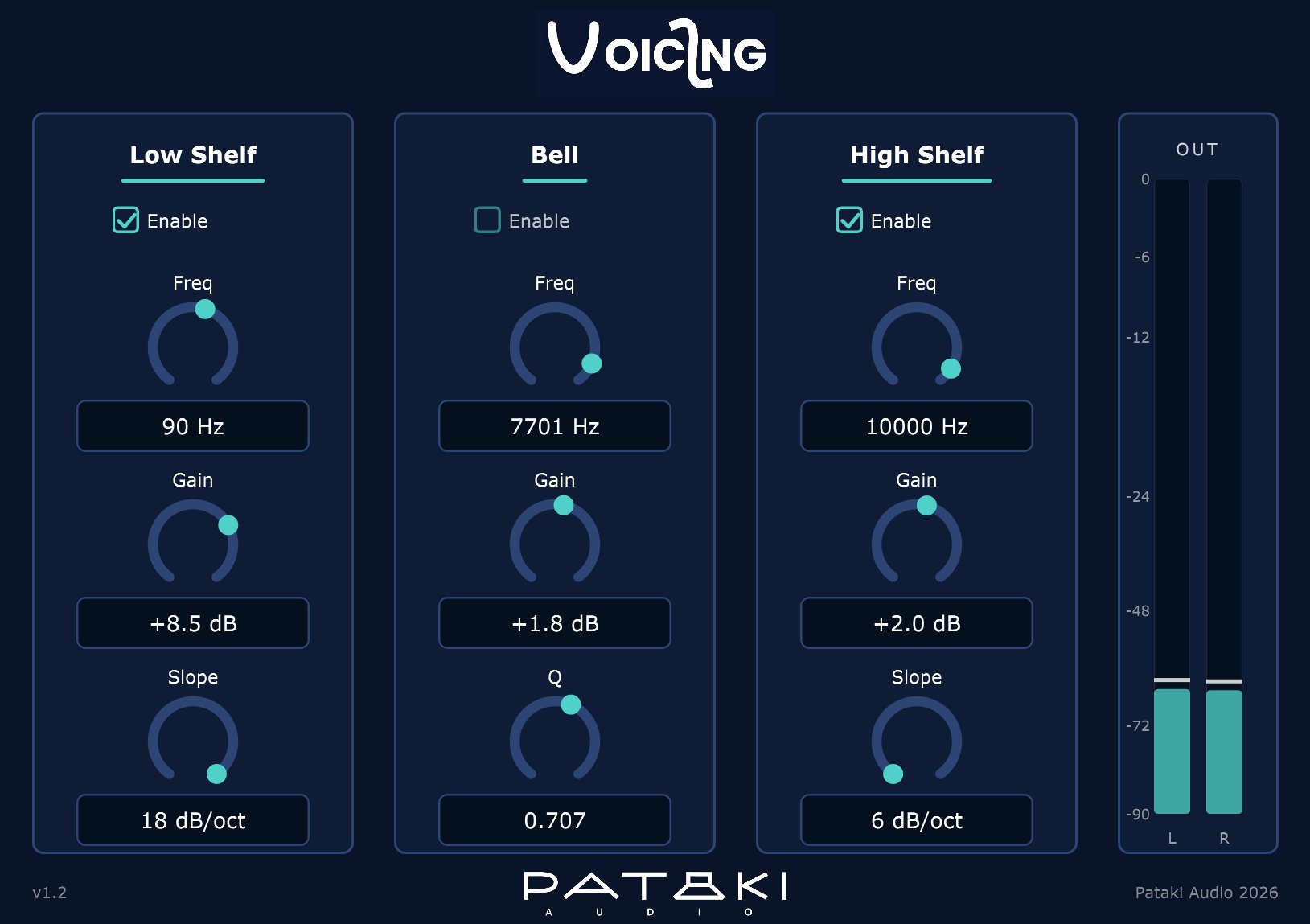
Voicing is a three-band tone control: a low shelf, a bell and a high shelf, processed in that order. It is built for setting the overall tonal balance of a system or a recording by ear — a house curve, a gentle tilt, a little presence — and for leaving it there.
The shelves follow the Baxandall tone-control shape: broad, gentle shoulders that taper smoothly toward their final gain, with no bump or overshoot. Cut and boost are mirror images of each other. The bell is a constant-Q peaking filter whose Q stops at 1.0, so it can lean and shape but never notch.
Everything is minimum phase with zero latency: whatever ringing a filter has comes after the sound, where the ear masks it, never before it. With all three gains at 0 dB the plugin is transparent to well below the noise floor of any real signal.
What Voicing deliberately is not: a surgical EQ. No high-Q notches, no extra bands, no mid/side, no dynamics. It is the listener-end counterpart to Janus — Janus divides the signal between drivers, Voicing shapes how the whole thing sounds.
Quick Start
- Unzip and copy
Voicing.vst3toC:\Program Files\Common Files\VST3\on Windows, or theVoicing.vst3folder to~/.vst3/on Linux (or your host's VST3 folder), then rescan plugins. - Insert Voicing on a stereo bus or at the end of a playback chain. All three bands are enabled and at 0 dB, so nothing changes yet.
- For a warmer balance, raise Low Shelf Gain by 2–3 dB around 100 Hz. For a darker top, lower High Shelf Gain by 1–2 dB around 8 kHz.
- Use the Enable checkbox above each band to hear exactly what that band is doing. The settings stay; only the band's contribution fades in or out.
- If a shelf sounds too broad, step its Slope from 6 to 12 or 18 dB/oct to keep the change closer to its corner.
Every value can also be typed: click the value box under a knob, type the number and press Enter. Frequencies are in plain Hz (250, 1500 — not 1.5k), gains in dB (-2.5), slope as dB/oct or stages (12 dB/oct, 12 or 2 all select 12 dB/oct).
Controls
All continuous controls are smoothed over 30 ms, so you can move them during playback without zipper noise. Every control is automatable.
Low shelf
The shelf's midpoint: the frequency where the shelf has reached half its gain in dB. A +6 dB shelf at 100 Hz is +3 dB at 100 Hz, approaching +6 dB further below. This is the convention most engineers expect from "a shelf at 100 Hz".
The shelf's full gain, reached well below the midpoint. Positive boosts the low end, negative cuts it; the two are exact mirror images.
How quickly the shelf moves from flat to full gain. 6 dB/oct is the classic first-order Baxandall shape: the broadest and most gentle. 12 and 18 dB/oct cascade two or three identical stages, each carrying an equal share of the gain, so the total gain and the midpoint stay where you set them while the transition gets tighter.
Changing the slope during playback is click-free: the gain is redistributed between the stages smoothly over 30 ms.
Fades the band in or out over 10 ms. The filter keeps running while disabled, so re-enabling it produces no transient.
Bell
Centre frequency of the peak or dip.
Gain at the centre frequency. Boost and cut have the same width — a −4 dB bell is the exact inverse of a +4 dB bell at the same frequency and Q.
Width of the bell, constant regardless of gain. 0.3 is very wide — a broad tonal lean across several octaves; 1.0 is the narrowest setting, about 1.4 octaves wide, suited to presence or body. Q stops at 1.0 on purpose: narrower bells ring longer, and this is not a corrective EQ.
As for the low shelf: a 10 ms fade, with the filter kept running.
High shelf
The shelf's midpoint, as for the low shelf. The 12 kHz limit keeps the shelf's corner well inside the audio band at every sample rate, including 44.1 kHz.
The shelf's full gain, reached well above the midpoint.
As for the low shelf.
A 10 ms fade, with the filter kept running.
Bypass
Use your host's bypass. Because Voicing has no latency, bypassing it causes no timing shift anywhere in the chain.
Output Meter
The OUT meter on the right shows the peak level of the left and right outputs, after all three bands.
- Scale. 0 to −90 dBFS. The upper half of the meter covers 0 to −24 dB, so the range where music lives is spread out; the lower half compresses −24 to −90 dB.
- Ballistics. The bar rises instantly and falls at 17 dB per second.
- Peak hold. A thin line marks the recent peak. It holds for 1.5 seconds, then falls away.
- Clip. A sample at or above full scale (0 dBFS) lights the clip mark for 3 seconds. Click the meter to clear it.
Large boosts can push the output over full scale. If the clip mark lights, lower your source level or the boost — Voicing does not limit.
How It Works
The shelves
Each shelf stage is a first-order Baxandall prototype: one real pole and one real zero placed symmetrically around the midpoint frequency — for a gain G in dB, at fc / A and fc · A, with A = 10^(G/40). That symmetry is what makes the curve reciprocal and puts half the gain exactly at the midpoint.
The analog pole and zero are mapped to the digital domain with the matched-Z transform, which keeps their frequencies exactly where they are at every sample rate. The result: the audible curve is the same at 44.1 kHz and 192 kHz to within 0.3 dB below 14 kHz. The common alternative, the bilinear transform, bends the curve as it approaches Nyquist — up to 3.35 dB of difference between rates in the same test. The one trade-off is near Nyquist itself: a +20 dB high shelf at 5 kHz reaches +17.1 dB at 20 kHz in a 44.1 kHz session instead of the analog +18.1 dB, above the range where it matters.
Slopes of 12 and 18 dB/oct cascade two or three of these stages, each with an equal share of the gain.
The bell
A constant-Q peaking filter built on a trapezoidal (TPT) state-variable filter. The structure stays numerically well-behaved even for low frequencies at high sample rates — 60 Hz at 192 kHz — where a conventional biquad's poles crowd against the unit circle, and it can be modulated smoothly without zipper noise or instability.
Precision and transparency
- All filter states and coefficients are 64-bit double precision. Voicing processes in 64-bit when the host offers it and in 32-bit otherwise.
- No oversampling and no lookahead: latency is zero. Voicing reports a 0.5 s tail to the host, which covers the longest bell decay.
- With every gain at 0 dB, each filter reduces to exactly 1, and the output differs from the input by less than −140 dBFS.
- Denormals are prevented twice over: by the CPU's flush-to-zero mode and by a tiny offset injected into the filter states each block, so long silences never slow the CPU down.
Use Cases
House curve on a playback system
The job Voicing was designed for. After room correction or a crossover, a measured-flat system often sounds bright and thin in a real room. A gentle downward tilt — low shelf +2 to +4 dB at 100–200 Hz, high shelf −1 to −3 dB at 5–8 kHz, both at 6 dB/oct — brings it back toward what most listeners prefer. Set it once in JRiver or your player's VST3 chain and forget it.
Tonal balance per recording
A bright or thin recording often needs only a single broad move. The bell at Q 0.3–0.5 between 2 and 4 kHz, cut by 1–2 dB, takes the edge off without dulling the top; a 6 dB/oct high shelf does the same for cymbals and air.
Bass weight without boom
A 12 or 18 dB/oct low shelf at 60–80 Hz adds weight to the lowest octave while leaving the 150–300 Hz region, where boom lives, mostly untouched — something a 6 dB/oct shelf at the same setting cannot do.
In a multi-way active system
After Janus splits the signal, a Voicing per band — or one on the summed input — trims the balance between drivers by ear in a way that complements a measured crossover. With MetaHost, each stereo pair of a multichannel bus can carry its own Voicing.
Specifications
- Plugin format
- VST3
- OS support
- Windows 10+ (64-bit); Linux x64 with glibc 2.35+ (Ubuntu 22.04+, Debian 12+, Fedora 36+); Linux ARM64 with glibc 2.28+ (Raspberry Pi OS 64-bit on Pi 4/5, Ubuntu 20.04+ arm64)
- Channels
- Stereo; on wider buses channels 1–2 are processed and the rest pass through untouched (input and output widths must match)
- Sample rates
- 44.1 – 192 kHz; curves sample-rate invariant to 0.3 dB below 14 kHz
- Bands
- Low shelf → bell → high shelf, each with its own enable
- Low shelf
- 20 – 500 Hz, ±20 dB, 6 / 12 / 18 dB/oct
- Bell
- 60 Hz – 12 kHz, ±20 dB, Q 0.30 – 1.00
- High shelf
- 1 – 12 kHz, ±20 dB, 6 / 12 / 18 dB/oct
- Filter type
- Minimum phase. Shelves: Baxandall prototype, matched-Z. Bell: TPT state-variable, constant Q
- Latency
- 0 samples; 0.5 s tail reported
- Precision
- 64-bit double internally; 32- or 64-bit host I/O
- Smoothing
- 30 ms for controls, 10 ms crossfade for band enables
- Parameters
- 12 — Freq, Gain, Slope/Q and Enable per band — all automatable
- Bundle size
- ~4 MB (Windows) · ~4 MB (Linux)
- License
- Donationware — pay what you want, including €0
FAQ & Troubleshooting
I set a shelf to +6 dB at 100 Hz, but my analyzer shows only +3 dB at 100 Hz.
That is the midpoint convention: the frequency you set is where the shelf reaches half its gain in dB. The full +6 dB arrives an octave or more below. At 12 and 18 dB/oct it arrives sooner.
Why does Q stop at 1.0?
A narrow bell rings: the narrower it is, the longer its decay. Voicing's priorities are, in order, the least audible ringing and musical shapes. Above Q 1.0 the bell turns into a corrective tool, and that is a different product. For a narrow cut, use a parametric EQ — or Themis for measured correction.
Can I use it on a 5.1 or 7.1 bus?
Yes, in the sense that Voicing accepts any bus with two or more channels, as long as input and output match. It processes channels 1 and 2 as left and right, and passes every other channel through untouched. To voice all speakers, run one Voicing per pair inside MetaHost.
I typed "6 dB/oct" into the slope and got 18 dB/oct.
That was a bug in versions before 1.2.1. Update to 1.2.1: "6 dB/oct", "12" and "18 dB" now select what you typed, and a bare 1, 2 or 3 selects that number of stages.
Will my sessions from v1.2 load in v1.2.1?
Yes, unchanged. The saved state is byte-identical between the two versions.
Does Voicing add latency or change the phase?
No latency at all. Like every minimum-phase EQ — and every analog tone control — it shifts the phase where it changes the level, and only there; with a band at 0 dB, that band does nothing.
How do I install it on Linux?
Copy the Voicing.vst3 folder to ~/.vst3/ (or /usr/lib/vst3/ for all users), then rescan plugins in your host. Use the x64 download on a PC (glibc 2.35 or newer — Ubuntu 22.04+, Debian 12+, Fedora 36+ or a current Arch) and the ARM64 download on 64-bit ARM Linux such as a Raspberry Pi 4 or 5 running 64-bit Raspberry Pi OS (glibc 2.28 or newer). Neither needs a separate C++ runtime.
Design Notes
Voicing started as a personal tool: a last-stage EQ for applying a house curve to a playback system, set once and left alone. That use defined the priorities, in strict order: least audible ringing, musical shapes, numerical robustness across every sample rate, and zero colouration when flat. Every feature that doesn't serve that job was left out on purpose.
Minimum phase followed from the first priority. A linear-phase EQ moves half of every filter's ringing in front of the sound, as pre-ringing, which the ear does not mask. A minimum-phase filter puts all of it afterwards, where temporal masking hides it.
The Baxandall shape followed from the second. Peter Baxandall's 1952 tone control is still the reference for a shelf that sounds natural: no overshoot, no bump, gentle shoulders, and boost and cut that undo each other exactly. The matched-Z realisation keeps that shape the same at every sample rate, rather than letting it drift as rates change.
The adjustable slope was the one addition to the original single-slope design. A first-order shelf is wide — a bass boost at 80 Hz still reaches well into the low mids — so 12 and 18 dB/oct cascade the same stage two or three times. The character stays Baxandall; only the reach gets shorter.