

Overview
Themis corrects a PA — or any loudspeaker system — from one pink-noise recording per side. You play pink noise through each side of the system, record it at the listening position with whatever recorder you have (a measurement mic, an iPhone, an iPad …), and load the WAVs into Themis — or one WAV for both sides of a mono system. Themis compares the recording with an ideal pink-noise spectrum and fits a parametric EQ — up to 20 peaking bands plus two target shelves — that brings the system to your target curve. Then it runs that EQ on the live signal, with zero latency.
Exporting the EQ as text is optional. Themis is designed to sit in the signal chain as an insert and do the correction itself.
The fit is deliberately asymmetric. Peaks are excess energy and are cut at the resolution you choose. Dips are usually cancellations that a boost cannot fix, so Themis fills only the broad ones, keeps every boost gentle, and never lets a boost lift a nearby peak above where it was.
Quick Start
- Windows: unzip and copy the
Themis.vst3folder toC:\Program Files\Common Files\VST3\, then rescan plugins. No Visual C++ redistributable is needed.
Linux: copy theThemis.vst3folder to~/.vst3(just for you) or/usr/lib/vst3(all users), then rescan. - Insert Themis on the PA bus. It works at whatever channel count the host runs — mono, stereo, or a multichannel output such as JRiver's twelve channels. Channels 1, 3, 5 … get the Left correction and 2, 4, 6 … the Right (see Left & Right).
- Play full-range pink noise through the left side at a comfortable, steady level, and record at least 60 seconds at the listening position — 5 minutes for the most precise result. Turn off every kind of processing on the recorder (see Making the Recording). Do the same for the right side.
- Click LOAD LEFT and choose the left recording, then LOAD RIGHT and the right one. For a mono system, load the same file with both buttons. Themis analyses each recording and fits its correction in about a second.
- Use the LEFT / RIGHT switch at the top right of the graph to look at either side.
- If you have a calibration file for your mic, click LOAD CAL.
- Adjust the target and the correction limits; the fit follows your changes.
- Optionally, click EXPORT PEQ to save the EQ as text.
Until you load a recording, Themis passes audio through unchanged. A side without a recording passes its channels unchanged.
Why odd channels Left, even channels Right? Each side's recording measures that side as a whole — everything that reaches the mic. The same correction on all of a side's channels is therefore right even if Themis sits after a crossover that has already split the signal into driver feeds, and odd/even matches the usual stereo pair per way (1/2 woofers, 3/4 mids, 5/6 tweeters).
Making the Recording
Length
60 seconds is the minimum. 5 minutes gives the most precise result.
A 60-second recording is enough for a dependable correction from 200 Hz up. Every extra minute cleans up the low end; at 5 minutes the measurement is accurate to about ±0.3 dB (±0.4 dB worst case) right down to 20 Hz. If correction below 60 Hz matters to you — subwoofers, room modes — record the full 5 minutes.
Themis discards the first and last second of the file, to drop handling noise and the generator starting and stopping. The reason length matters is resolution: Themis resolves the spectrum to 0.37 Hz so that it can see narrow room modes down to 20 Hz, and at that resolution only a few frequency bins cover each 1/6 octave in the deep bass, so the random nature of the noise shows. Longer recordings average it away. The table shows the largest deviation, at 1/6-octave smoothing, of a perfectly flat system's measured response from 20 Hz to 20 kHz:
| Recording | Typical worst-case deviation | Worst seen |
|---|---|---|
| 60 s (minimum) | ±0.8 dB | ±1.1 dB |
| 2 min | ±0.5 dB | ±0.6 dB |
| 3 min | ±0.36 dB | ±0.53 dB |
| 5 min (most precise) | ±0.29 dB | ±0.39 dB |
The deviation is almost entirely below 60 Hz; above 200 Hz even a 60-second recording is within ±0.5 dB.
Recorder settings
Phones, tablets and many recording apps "help" by processing the microphone signal. Every one of these processes changes the spectrum Themis measures, so turn them off:
- AGC (automatic gain control): off.
- Voice processing, noise suppression, echo cancellation, "enhance" or "speech" modes: off.
- On iOS: use a recorder app that records in Measurement mode — the only iOS mode with voice processing disabled. The built-in Voice Memos app is not suitable.
- Record as uncompressed WAV: 16-, 24- or 32-bit PCM, or 32-bit float, at 44.1 to 192 kHz.
Themis checks for two symptoms of a misconfigured recorder:
- Level unstable. The level of each 1-second block is measured. If the blocks vary by more than 1.5 dB (standard deviation), AGC, compression or noise suppression was probably active.
- Clipping. Three or more consecutive samples at full scale. Lower the playback level or the recorder gain.
Themis still analyses a file that triggers either warning, but treat the result with suspicion.
Pink noise
Themis compares the recording with ideal pink noise, whose power falls by 3 dB per octave over the whole audio band, and assumes your generator really produces that, down to at least the lower correction limit (30 Hz by default). Some generators band-limit their pink noise (with a 20 Hz or 40 Hz high-pass, say), and some produce noise that is only approximately pink. Themis cannot tell the generator's shortfall from your speakers' shortfall, and will try to correct both.
Use true full-range pink noise. If your generator band-limits, set LOW LIMIT above its cut-off. Any random pink noise works: Themis needs no reference file and no time alignment.
Placement
Themis works from one position. Put the mic where the audience or the listener is, away from walls and reflective surfaces where you can, and point it as its calibration file assumes (usually at the source, 0°).
For PA work, consider a ground-plane measurement: lay the mic on the floor at the listening position, pointing at the source. At normal mic height the floor reflection adds a comb of peaks and notches between roughly 100 Hz and 2 kHz. That pattern belongs to that exact spot, and Themis would otherwise try to correct it. On the floor the reflection arrives in phase with the direct sound and the comb disappears; the overall level rises by about 6 dB at all frequencies, which Themis's normalisation ignores.
Mic Calibration Files
LOAD CAL accepts plain text with one point per line: frequency in Hz, then the level in dB, optionally followed by a phase column, which is ignored. Spaces, tabs, commas and semicolons all work as separators. Lines that do not start with a number are skipped, so comments, * lines and UMIK-style headers such as "Sens Factor = …" are fine.
The cal file describes the mic's own deviation, and Themis subtracts it from the measurement. Between points it interpolates linearly in dB against log frequency. Outside the file's range it holds the end values, and the status area tells you that the file does not cover the full 10 Hz – 20 kHz analysis range.
The cal file applies to both sides (one mic). Loading or clearing it (CLEAR CAL) re-runs the analysis from the stored spectra; the WAVs are not read again.
Controls
Correction
The largest boost the correction may apply. The summed correction, shelves included, never exceeds it by more than 0.2 dB, even where several bands overlap.
The largest cut the correction may apply, with the same 0.2 dB guarantee.
The edges of the correction range. Outside it the correction fades to 0 dB over 1/3 octave, and the graph shades those regions. The EQ bands never boost beyond the limits: there the boost they may apply falls from Max Fill to 0.3 dB over a third of an octave and stays there, so a band's skirt cannot push subwoofers into excursion below their working range. The target shelves are exempt — they do what you set.
Set LOW LIMIT at or above the system's real low-frequency limit (its −3 dB point), not below it.
The maximum number of peaking bands. The two target shelves are extra. Themis uses fewer when fewer do the job — on an already-flat system it may use almost none.
Why fill is capped. A dip in a measured response is usually not a lack of energy. It is a cancellation, where the direct sound and a reflection arrive out of phase at the mic. Boosting into a cancellation feeds both paths equally: the dip barely moves while the amplifiers and drivers work much harder, and since the cancellation moves as soon as you move the mic, filling it can make the response worse everywhere else. Peaks are excess energy — room modes, driver resonances — and cutting them is safe. Hence up to 12 dB of cut but only 3 dB of fill by default.
Raise MAX FILL only for broad, genuine deficits, such as a gentle HF roll-off, or together with LF DIP FILL for dips in the bass. AUTO MAKEUP lowers the output by the largest boost, so every extra dB of fill costs a dB of level. Above about 6 dB, check that your amplifiers and drivers have that headroom.
How Themis decides what to boost and what to cut:
- Peaks are cut at the resolution you choose with SMOOTHING, including narrow ones such as room modes, with Q up to 12.
- Dips are filled only as far as they are broad. The amount of fill comes from a 1/3-octave view of the response, in which narrow cancellations mostly disappear and genuine broad deficits remain. A narrow, deep dip stays largely as it is — intended, not a missed correction. LF DIP FILL relaxes this below about 300 Hz.
- A boost never makes a point worse. Themis strongly avoids any boost that would lift part of the response above both where it was and the target. A broad boost aimed at a group of dips will not push up a narrow peak between them.
- Boosts are gentle. A boost band's Q is at most 4, and lower in the deep bass (about 1.8 at 20 Hz, 2.7 at 30 Hz), so a boost never rings for long.
- No boost outside the correction range (see Low Limit · High Limit above).
Target
A second-order low shelf (Q 0.707) on the otherwise flat target — for a bass lift, say.
A second-order high shelf (Q 0.707), typically for a gentle treble roll-off.
Both shelves are realised as two dedicated filters in the correction, so the target is always exactly achievable — but MAX FILL and MAX CUT cap them too. A +6 dB LF shelf with MAX FILL at 3 dB cannot be met, and the status area reports by how much it falls short.
Analysis
Smooths the measured response before the fit. 1/6 octave is a good general choice. Use 1/12 octave to resolve closely spaced low-frequency modes (two modes 10 Hz apart around 40 Hz, for example), and 1/3 octave for a gentler, broader correction.
Variable uses 1/12 octave below 200 Hz and widens gradually to 1/3 octave above 2 kHz. Room modes in the bass are narrow and need fine smoothing; above a few hundred hertz, much of the fine detail in a single-position measurement comes from reflections that change a few centimetres away, and correcting it helps the mic but not the audience. In simulations of a PA in a room with floor and wall reflections, Variable gave the best overall result for the audience: it corrected a narrow 45 Hz room mode to within about 1.7 dB, where 1/3 octave left about 3.9 dB. Its cost is that narrow problems in the treble are treated as broadly as at 1/3 octave.
Whatever the smoothing, a correction from one position also picks up that position's reflections, especially the floor bounce between roughly 100 Hz and 2 kHz. If the system already sounds right, correcting from one position can make it slightly worse for the audience. Keep MAX FILL low, and consider a ground-plane measurement.
Lets Themis fill narrow dips in the bass. Below about 300 Hz — the room-mode region — a narrow dip can be a room or boundary effect that a boost really does fix; higher up, narrow dips are almost always reflection combs that move with the mic. With LF DIP FILL on, fill is judged at 1/6 octave up to 300 Hz, widening to the normal 1/3 octave by 500 Hz, so narrow bass dips are filled up to MAX FILL while the mids and treble are treated exactly as before. A boost still never lifts the peak next to a dip.
It only shows its effect when MAX FILL leaves room: most bass dips are deeper than 3 dB, so try MAX FILL 6 dB or more. On a test measurement at MAX FILL 6 dB it raised four bass dips (52, 90, 120 and 200 Hz) by 3 to 4 dB each, and the narrow bass peaks between them were corrected better too.
It costs headroom — the largest boost becomes the makeup gain, often 6 dB or more. Not every bass dip is fixable: a cancellation between a sub and a wall does not move when you boost it. And with a high MAX FILL, Themis can boost right down to LOW LIMIT to fill the subwoofers' roll-off, so set LOW LIMIT carefully.
Switches the graph's level axis from ±18 dB to ±6 dB. Saved with the session, along with the window size.
Output
Lowers the output by the largest boost of either side's correction, so the system never gets louder because of the correction. Both sides get the same makeup, so the Left/Right balance never changes.
Applied after auto makeup.
Crossfades over 20 ms, click-free.
Only Output Trim and Bypass are automatable. Every parameter that shapes the fit is deliberately non-automatable, so host automation can never make a live system refit.
Left & Right
Each side has its own recording and its own correction, fitted with the same controls: Max Fill, the target, the range, the bands and the rest apply to both. The mic calibration file is shared too.
- Channel mapping — channels 1, 3, 5 … (odd) get the Left correction and 2, 4, 6 … (even) the Right. A mono bus gets the Left correction.
- Mono systems — load the same recording with LOAD LEFT and LOAD RIGHT. Both sides then get identical corrections.
- Shape only, no level matching — each side is normalised to its own target. Themis corrects the shape of each side's response, not a level difference between the two recordings: separate takes rarely keep identical recorder gain (phones adjust it, and so do handling and distance), so their absolute levels cannot be trusted. Set the level balance of your system as usual.
- Common makeup — with Auto Makeup on, both sides are lowered by the same amount, set by the larger boost of the two corrections, so the correction never changes the balance between Left and Right.
- Changing one side — loading a new recording for one side leaves the other side's correction running untouched, without a click. Only the makeup can move, smoothly, if the new side needs more boost.
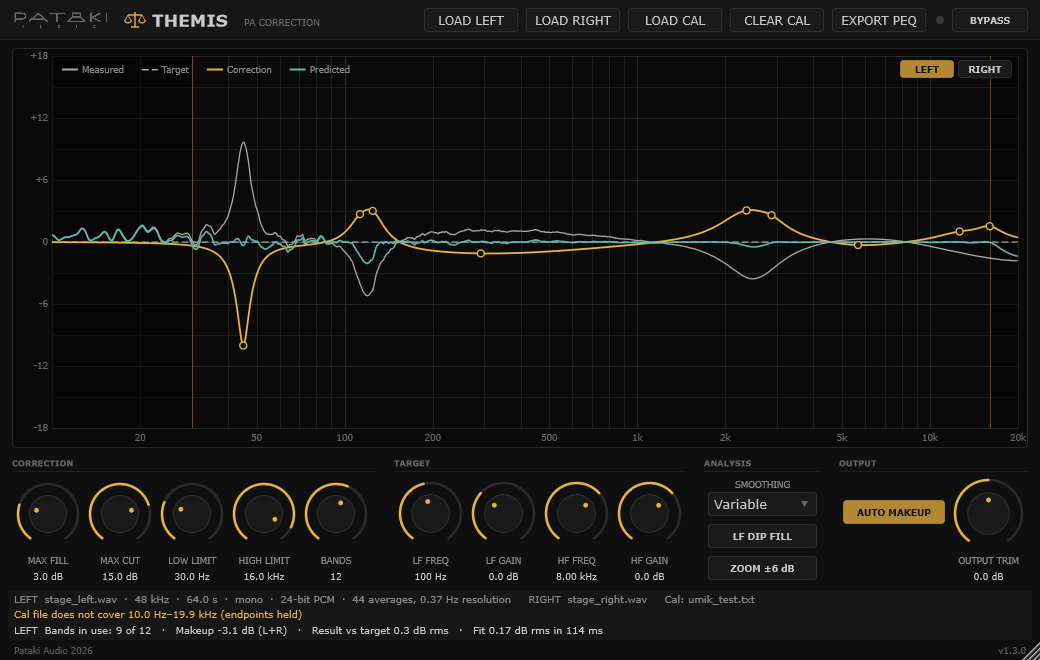
The Graph & Status
- Measured (grey) — the recording, smoothed and normalised, corrected for the mic if a cal file is loaded.
- Target (dashed) — flat plus the shelves.
- Correction (amber) — the total EQ Themis applies, shelves included.
- Predicted (teal) — measured plus correction: the response you should get after correction.
- Markers — circles are peaking bands, squares are shelves. Hover over one to read its frequency, Q and gain.
LEFT / RIGHT (top right of the graph) chooses which side the graph and the status area show. Loading a recording switches the view to that side.
The status area below the controls shows the viewed side's file information and the other side's file name, the warnings for both sides (marked L: and R:), and the viewed side's number of bands in use, plus two figures for the viewed side:
- Result vs target — the RMS difference between the predicted response and the target over the correction range. Narrow dips that Themis deliberately leaves alone count here, so on a single-position measurement this figure rarely gets close to zero.
- Fit — how closely the EQ matches the correction Themis set out to apply (after the fill and cut limits), and how long the fit took.
Exporting the PEQ
EXPORT PEQ writes one UTF-8 text file, with a section per side, that you can copy into a console or DSP:
# Themis PEQ export — Pataki Audio
# Left:  stage_left.wav (48000 Hz, 64.0 s, mono)
# Right: stage_right.wav (48000 Hz, 64.0 s, mono)
# Cal: umik_test.txt
# Smoothing 1/6 oct | Range 30–16000 Hz | Max fill 3.0 dB | Max cut 15.0 dB
# Q convention: RBJ Audio EQ Cookbook
# Channels: Left = 1, 3, 5, ...  Right = 2, 4, 6, ...

[Left]
Preamp  -4.6 dB
Type  Freq_Hz    Gain_dB   Q
PK        45.0     -9.2    6.12
PK       112.2     +2.1    4.00
PK       396.0     -1.1    0.66
…

[Right]
Preamp  -4.6 dB
Type  Freq_Hz    Gain_dB   Q
PK        80.0     -7.6    4.88
PK       547.8     +2.3    3.89
PK       661.1     +2.4    3.25
…
Preamp is the gain Themis applies: auto makeup plus output trim. It is the same in both sections, because the makeup is common. Shelves appear as LS / HS lines when they are in use. A side without a recording is listed in the header as passing audio unchanged and gets no section.
Q values use the RBJ Audio EQ Cookbook convention: for a peaking band, Q is measured between the points where the boost or cut is half its dB value. Consoles and DSPs that define Q differently may need conversion:
- Bandwidth in octaves: BW = (2 / ln 2) · asinh(1 / (2Q)). Q 1.41 corresponds to 1.0 octave.
- Q measured at −3 dB points (constant-Q or "proportional-Q" designs): the two conventions agree only for large gains. Check your console's documentation.
Saving, Recall & Refits
When the fit runs
A change to any fit-related control refits the EQ 150 ms after you stop moving it. When a new EQ is ready, Themis crossfades from the old one to the new one over 50 ms, so even a refit during a show is click-free.
Recall
The host session stores everything Themis needs: the analysed spectrum, the recording's details, the cal curve and its file name, all parameters, and the fitted EQ. When a session is reloaded, Themis uses the stored EQ exactly as it was. It does not refit, and it needs neither the WAV nor the cal file — you can delete them. A new fit runs only after you change something.
A session saved with Themis 1.0 – 1.2 (one recording) opens in 1.3 with that recording and its EQ on both sides, so it sounds exactly as before.
Specifications
- Plugin format
- VST3 (category Fx · EQ)
- OS support
- Windows 10+ (64-bit), no runtime install needed · Linux x64 (glibc 2.34+: Ubuntu 22.04+, Debian 12+, Fedora 35+, RHEL 9+; fontconfig and FreeType) · Linux ARM64 with glibc 2.28+ (Raspberry Pi OS 64-bit on Pi 4/5, Ubuntu 20.04+ arm64)
- Channels
- 1 – 64, equal in and out; odd channels run the Left correction, even channels the Right (a mono bus runs Left)
- Latency
- 0 samples
- Filters
- Up to 20 peaking bands + 2 target shelves; double-precision biquad cascade (transposed direct form II); matched digital design within 0.17 dB of the analog prototype to 15 kHz at 44.1 kHz
- Sample rates
- 44.1 – 192 kHz. The fit is rate-independent: a recording at one rate drives the correction at any host rate
- Recording input
- One WAV per side (the same file for both on a mono system), 16/24/32-bit PCM or 32-bit float, 44.1 – 192 kHz, mono or multichannel (summed to mono)
- Recording length
- 60 s minimum · 5 min for the most precise result
- Analysis
- Welch PSD, Hann, 50% overlap, 0.37 Hz resolution; 96 points per octave from 10 Hz to 20 kHz
- Cal files
- Plain-text frequency / dB (phase ignored), UMIK-style headers accepted
- Parameters
- 14; only Output Trim and Bypass are automatable
- Validation
- pluginval (strictness 10) and the Steinberg VST3 validator pass on Windows and Linux
- Trace log
%LOCALAPPDATA%\PatakiAudio\Themis\trace.log·~/.config/PatakiAudio/Themis/trace.log- License
- Donationware — pay what you want, including €0
FAQ & Troubleshooting
"Recording too short"
Themis discards one second at each end and refuses files with less than 30 seconds left. Record at least 60 seconds — and 5 minutes for the most precise result.
"Level unstable"
Turn off AGC, compression and noise suppression on the recorder. On iOS, use an app with Measurement mode (see Making the Recording).
"Clipping in the recording"
Lower the playback level or the recorder gain and record again.
"Cal file does not cover …"
The cal file stops short of 10 Hz or 20 kHz, and its end values are used beyond that. Usually harmless.
"Caps not met"
The target shelves need more boost or cut than MAX FILL / MAX CUT allow. Raise the cap or reduce the shelf.
One side is not corrected.
It has no recording: load it with LOAD LEFT or LOAD RIGHT. The status line says which side passes unchanged. For a mono system, load the same file on both.
Narrow dips stay in the predicted curve.
Intended: narrow dips are usually cancellations that boosting cannot fix. Use a ground-plane measurement or move the mic. For dips below about 300 Hz, try LF DIP FILL with MAX FILL at 6 dB or more.
The correction looks odd below about 40 Hz.
Check that your generator's pink noise is truly full range, and that the recording is long enough — the deep bass is where a short recording shows its noise. Five minutes settles it.
Does it work in JRiver Media Center?
Yes. JRiver runs its whole DSP chain at the output's channel count — twelve channels on a 7.1.4 system — and Themis accepts any count from 1 to 64, with the same number in and out, applying the Left correction to the odd channels (1, 3, 5 …) and the Right correction to the even ones. Until a recording is loaded it passes audio through unchanged.
What does Themis deliberately not do?
Version 1 has no multi-position or spatial averaging, no Left/Right level matching, no swept-sine, impulse-response or transfer-function measurement, no phase correction or FIR, no ambient-noise capture and no console-specific export formats. One position and one recording per side, one minimum-phase parametric EQ per side.
Something misbehaved.
Themis records any internal error in %LOCALAPPDATA%\PatakiAudio\Themis\trace.log (Windows) or ~/.config/PatakiAudio/Themis/trace.log (Linux). Please send that file with your report to info@patakiaudio.com.